

Change Instance Resource
You can adjust the resources allocated to your DewaVPS Instance, such as CPU, RAM, and Disk space, to better match your application's performance needs or budget.
Important Considerations:
- Downtime Required: Resizing requires the Instance to be powered off. Plan for downtime accordingly.
- Cost Changes: Adjusting resources will change the hourly and monthly cost of your Instance.
- Storage Cannot Be Downgraded: Once disk size is increased, it cannot be reduced.
1. Power Off Your Instance (Required)
Before you can resize, the Instance must be completely shut down.
- Navigate to Instances → Virtual Machines.
- Click on the Instance name to view its details.
- Click the Shutdown button.
- Wait for the Instance status to update to "Stopped".
2. Access Change Resource
- Select the Settings tab on the Instance detail page.
- Click Change Resource to expand the panel.
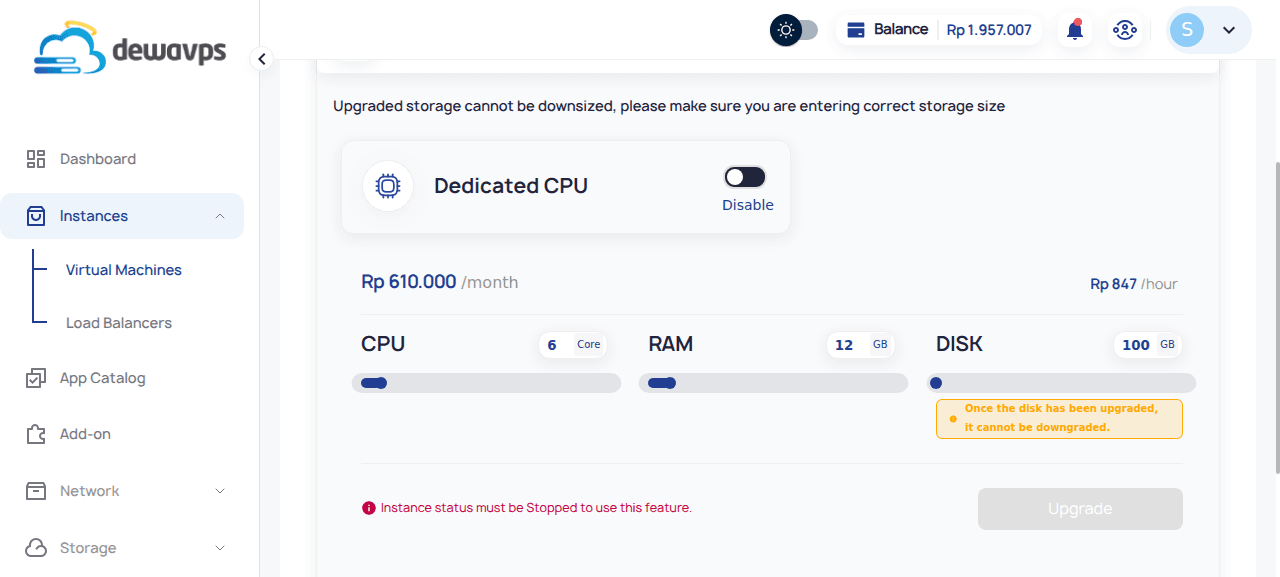
3. Adjust Resources
Use the sliders or input fields to modify:
| Resource | Description |
|---|---|
| CPU | Number of virtual CPU cores |
| RAM | Memory allocated in GB |
| Disk | Storage size in GB (can only increase) |
Dedicated CPU Option
Enable Dedicated CPU for guaranteed CPU cores (no sharing with other instances).
Warning: "Upgraded storage cannot be downsized, please make sure you are entering correct storage size"
4. Review Pricing
As you adjust settings, the updated cost is displayed:
- Monthly price
- Hourly price
5. Confirm Upgrade
- Review the new configuration and cost.
- Click Upgrade to start the resizing process.
Note: Instance status must be Stopped to use this feature.
6. Power On Your Instance
- Navigate back to the Instance detail page.
- Click Run to start the Instance.
- Wait for the status to change to "Running".
Post-Resize Steps
Verify Resources
Log in via SSH and verify CPU/RAM with:
htop
lscpu
free -h
Expand Filesystem (If Needed)
If you increased disk size, you may need to manually extend the partition:
# Check current disk layout
lsblk

# Extend partition (example: partition 1 on vda)
sudo growpart /dev/vda 1

# Resize filesystem
sudo resize2fs /dev/vda1  # for ext4
# or
sudo xfs_growfs /        # for XFS