

Attach Block Storage
Attaching a Block Storage volume to an instance allows your instance to use the additional storage space for data, applications, or backups.
Prerequisites
- A created Block Storage volume (see Create Block Storage)
- An instance in the same location as the Block Storage
Steps to Attach Block Storage
-
Log in to your DewaVPS control panel.
-
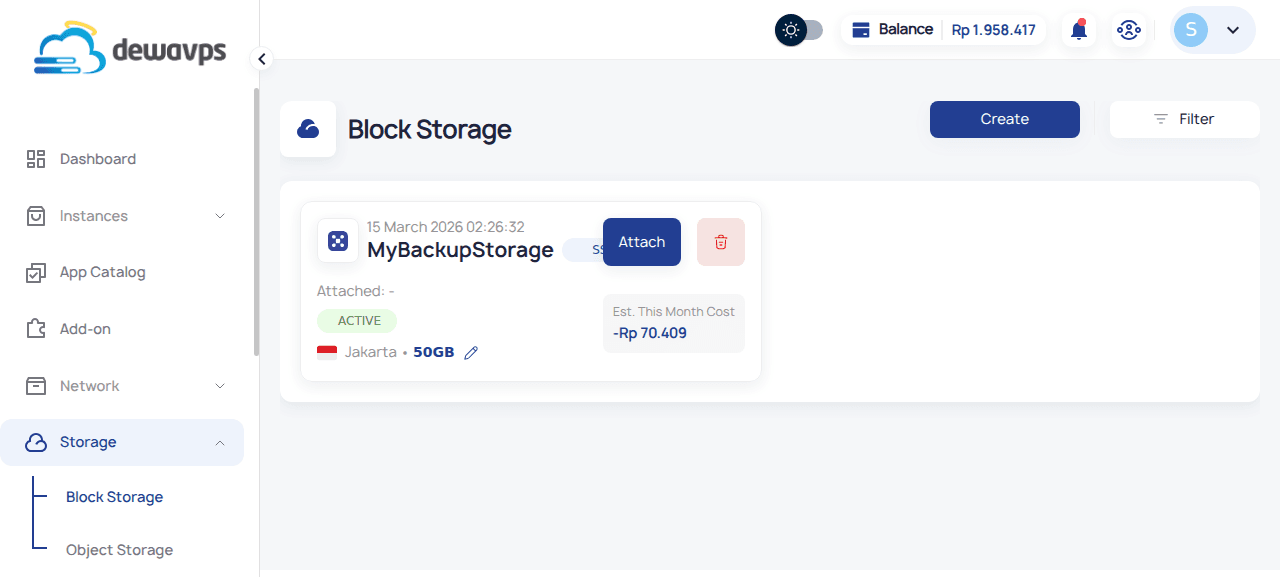
Navigate to Storage → Block Storage.
-
Find the Block Storage volume you want to attach.
-
Click the Attach button on the Block Storage card.
-
Select the instance you want to attach the storage to from the dropdown.
-
Click Confirm to complete the attachment.
After Attaching
Once attached, you'll need to format and mount the storage inside your instance:
# List all disks to find your new block storage
lsblk

# Format the new disk (e.g., /dev/vdb)
sudo mkfs.ext4 /dev/vdb

# Create a mount point
sudo mkdir /mnt/storage

# Mount the disk
sudo mount /dev/vdb /mnt/storage

# Add to /etc/fstab for automatic mounting on boot
echo '/dev/vdb /mnt/storage ext4 defaults 0 2' | sudo tee -a /etc/fstab
Detaching
To detach block storage, first unmount it from your instance, then click the detach option in the control panel.